Login to DXtrade WEB Terminal via SSO
Here are the steps to integrate with Devexperts SSO API and provide a single-sign on from <Broker>’s customer portal to Devexperts Trading platform.
API is HTTP-based.
All the errors are reflected as HTTP error codes with some valid descriptions.
As always, HTTP status codes 200 and 201 mean “okay”, HTTP 4xx codes mean ‘client-side error’ – some error in parameters, HTTP 5xx codes mean internal server errors.
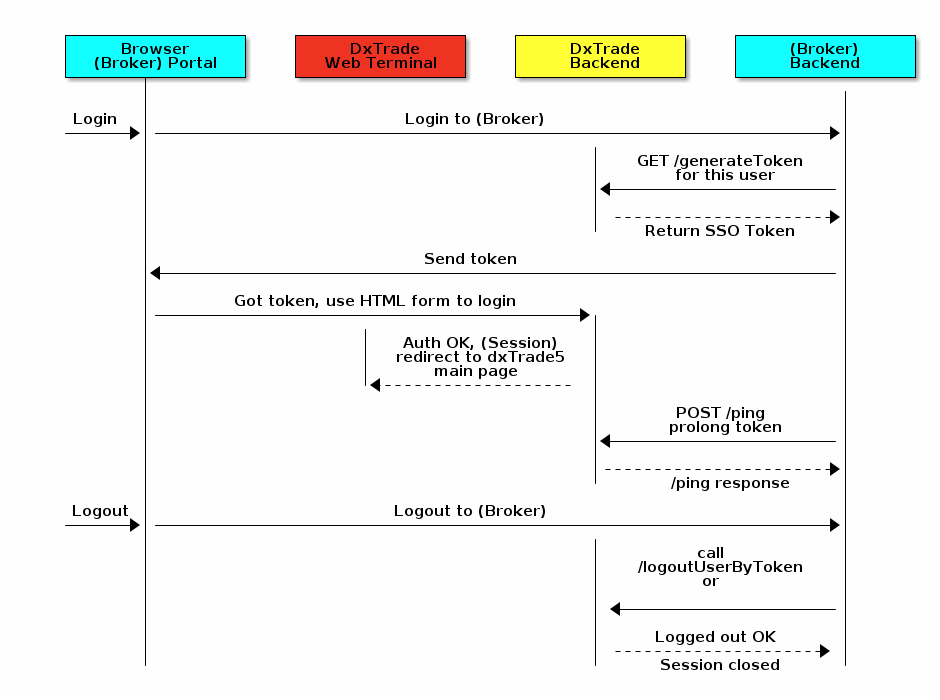
1.Login Sequence
Preconditions:
<Broker> portal should have hidden form with such HTML:
<form target="_blank" action=“<broker">-trading.com/api/auth/login/form-with-token" method="POST">
    <input type="text" name="token" value="" />
    <input type="submit" value="Submit request" />
</form>
How to log-in trader to trading platform:
-
Assuming user is already logged in to <Broker> portal at this point.
-
<Broker> Portal backend calls <DXtrade backend> (dxWeb API) /generateToken with parameters – which user (login name, domain) to create SSO token for.
-
As a result, <DXtrade backend> sends back an HMAC256 -generated token. <Broker> may record that token to be able to later log out the user,
as token, besides other information, is linked with the new session and may be used to logout the particular client session. -
(<Broker side>) This token in Base64-form is sent back as a redirect for the client’s Browser (in case of mobile, the same happens: mobile app will parse the token parameter in the return URL and reuse it in internal API call)
-
<Broker> Portal fills form from preconditions with token and submits it.
-
<DXtrade WEB terminal> parses the token, passes to <DXtrade Backend> for validation. If token is valid and not outdated, then new session is created for that user by <DXtrade Backend> and browser is redirected to <DXtrade WEB terminal> main page.
-
User is logged in and may start trading.
-
<Broker> prolonges user session by sending
/pingrequests to <DXtrade Backend>. For information on how/pingworks see HTTP POST request for session prolongation.
2.Logout Sequence
How to logout trader from trading platform:
-
Users logs out of <Broker> portal
-
<Broker backend> calls the /logoutByToken method with previously recorded token and login/domain of the user or /logoutByLogin method with login/domain on <DXtrade Backend> (dxWeb API) and user is logged out from all trading sessions (all <DXtrade>’s sessions are closed).
And yes, we’ve got Swagger page to help you with integration, contact your account manager to get one.