Processing client’s subscriptions
1. Intro
User creation and subscription management could be handled with DxTradeXT REST API.
Components:
-
DxTradeXT - DxTrade REST API (api docs)
-
DxFeed - dxFeed REST API (dxFeed Retail Services Platform API)
-
CRM - external service
DxTradeXT supports 3 modes:
| Mode | Description |
|---|---|
Single feed mode |
Nothing should be managed with API, all clients have one feed. |
DxTradeXT mode |
DxFeed account shouldn’t be managed manually, it’s created on first login, user purchases subscriptions directly from dxFeed. |
CRM mode |
External system should create dxFeed account, link it to XT account |
Entities:
-
DxFeed account
-
DxTrade user
-
DxTrade account(s)
DxTrade user should be linked to dxFeed account (after first login or after creation).
-
2. Main scenarios
2.1 User Creation
In CRM mode a DxFeed account is expected to be created by CRM. Then, on DxTrade user account creation the dxFeedAccountId, acquired on previous step, should be provided. In DxTradeXT mode - only user email should be specified.
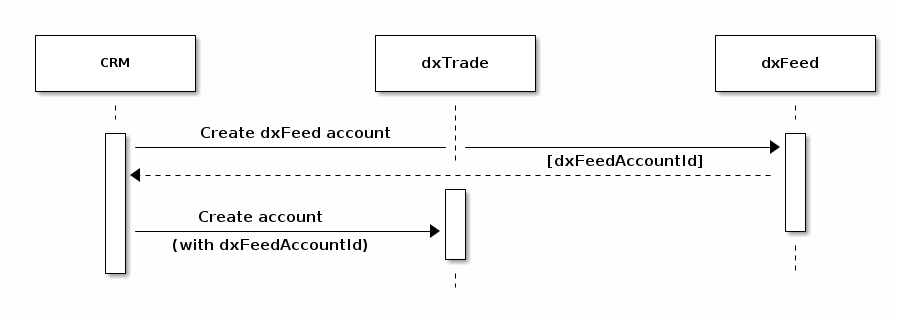
The request, CRM creates DxTrade user account with (in DxTradeXT via REST API):
POST https://<host>/dxweb/#!/dxRegister/createClient
{
 "domain": "default",
 "login": "prop-client",
 "accounts": [
   {
     "clearingCode": "default",
     "accountCode": "prop-client-acc",
     "type": "CLIENT",
     "status": "FULL_TRADING",
     "accountCashType": "MARGIN",
     "accountType": "DEMO",
     "currency": "USD",
     "balance": 1000000,
     "categories": [
       {
         "category": "TRADE_TYPE",
         "value": "FUTURES"
       }
     ]
    }
  ],
 "email": "bob.smith@gmail.com", # for DxTradeXT based mode
 "dxFeedAccountId": "6ddbec14-dd36-4358-adbb-80421d044ba3" # for CRM based mode
 "type": "CLIENT",
 "status": "ONLINE",
 "password": "test"
}
2.2 User Login
In case the user already exists and has linked dxFeed account, on login the current subscriptions set is requested (synced) and if it’s not empty the user is logged in and the subscription set is refreshed, otherwise login failed. If there is no linked account, most probably it has not been created yet (see previous step, 2.1 User Creation)
2.3 User Deactivation
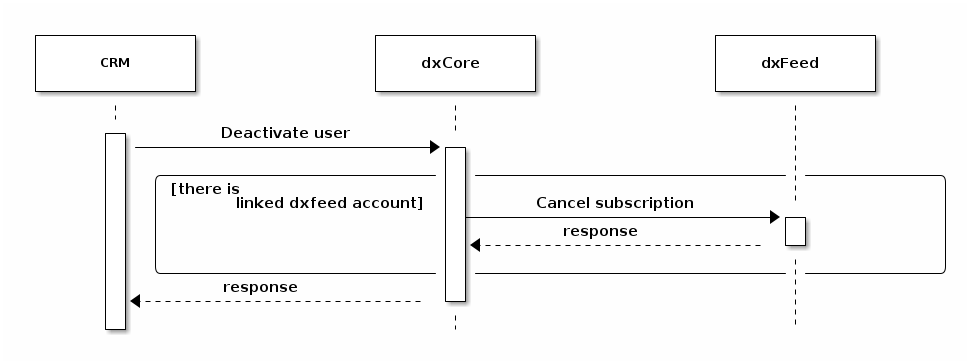
DxTrade user deactivation request by CRM:
POST https://<host>/dxweb/#!/register/client/{domain}/{login}/disable-user-and-terminate-accounts
{
  "cancelDxFeedSubscriptions": true
}
All user’s subscriptions will be cancelled.
2.4 User Reactivation
DxTrade user reactivation by CRM has following requests sequence:
-
update user status
PUT https://<host>/dxweb/#!/register/client/{domain}/{login} { "status": "OFFLINE" } -
new account
 POST https://<host>/dxweb/#!/register/client/{domain}/{login}/account
 {
   "clearingCode": "default",
   "accountCode": "client-2-acc-code",
   "type": "CLIENT",
   "status": "FULL_TRADING",
   "accountCashType": "MARGIN",
   "accountType": "DEMO",
   "currency": "USD",
   "balance": 1000000,
   "categories": [
     {
       "category": "TRADE_TYPE",
       "value": "FUTURES"
     }
   ]
}
2.5 Callbacks from dxFeed
DxTrade XT listens for subscriptions updates from dxFeed, once update received subscriptions updated, user logged out.
Callbacks for subscriptions activation (see more: DxFeed Knowledge Base) and deactivation (see more: DxFeed Knowledge Base).
Also it is possible that DxFeed removes subscription. After that DxFeed can make a callback.
Summarizing, it should be noted that there are DxFeed callbacks sent to DxCore on any subscriptions update event (activation, deactivation, adding, removing etc.)
2.6 Redirects
DxFeed supports redirects after onboarding (dxFeed account creation): In DxTradeXT mode the user is redirected to DxTrade, in CRM mode - the redirection should be configured on CRM side git push